
Superhero Elements: 18 Website Parts, No Plugins
The menus, FAQs, sliders and animations every site asks for, built once, built properly, and named so you can ask for them.
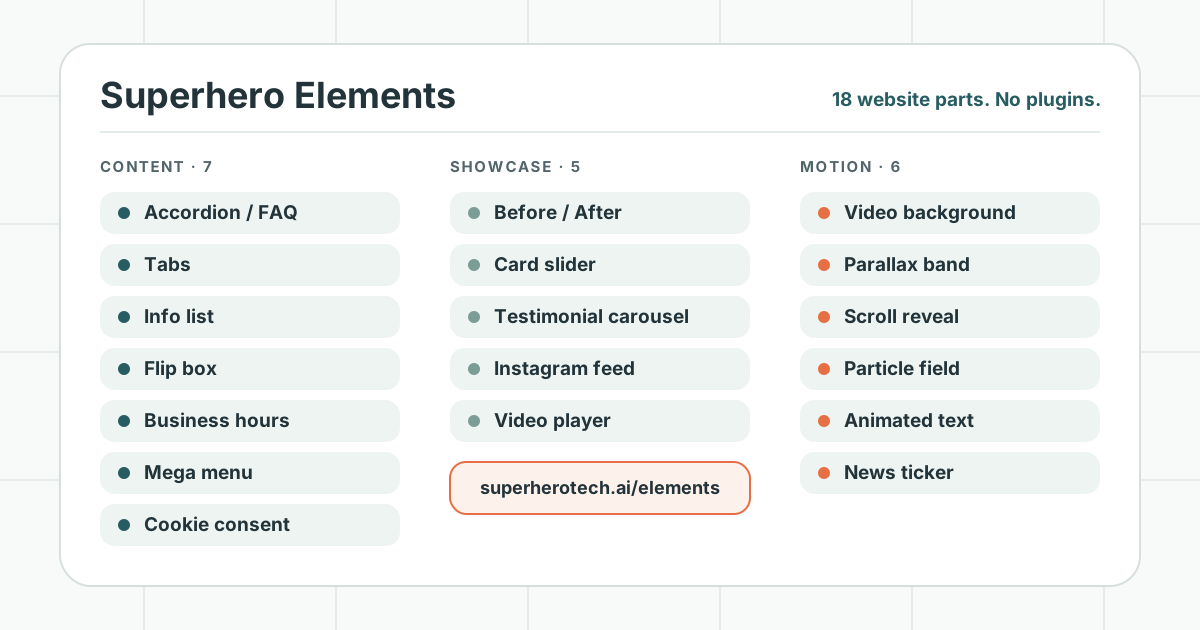
Ask ten small business owners what they want from a website and you will hear the same handful of things.
A menu that shows every service without turning into a wall of links. An FAQ that works on a phone. Testimonials that move. A before-and-after of the work. A video. Opening hours that are right on a holiday.
None of it is exotic. But on a typical WordPress site, each one arrives the same way: as a plugin, or as an add-on to whatever page builder the site was made with. Each comes with its own updates, its own script, sometimes its own subscription, and its own chance of being abandoned by whoever wrote it. Nobody chooses that on purpose. It is simply what “add a slider” costs when the slider is somebody else’s product.
So we built the parts ourselves, once, properly, and gave each one a plain name. We call the collection Superhero Elements, and there are 18 of them today.
What an Element is
An Element is one self-contained part of a web page: a before-and-after slider, a mega menu, a cookie banner. Each is a single file with no dependencies. That is why there is no plugin to keep updated and no plugin directory to fall behind on. It is the same thinking as building small business sites on Astro rather than WordPress. An Element takes its colors and type from the site it sits in, so it looks like part of your site instead of a widget bolted onto it.
Every one of them follows the same three rules.
- It works for everyone. Each is operable from a keyboard and makes sense to a screen reader, and anything that animates respects a visitor’s reduced-motion setting.
- It does not need everything to go right. The FAQ is plain HTML that opens with no script at all. Tabs fall back to every panel under its own heading. Text set to fade in as you scroll stays visible if the script never loads.
- It does not call out until it has to. A YouTube video requests nothing from YouTube until someone presses play. The Instagram grid makes no call to Instagram from the page. The cookie bar can hold back everything from Google until a visitor has said yes.
Each Element also has a name you can use in a request, which turns out to matter more than it sounds. “The before-after on our home page, with the old and new kitchen photos” is a complete instruction. The names these parts go by on WordPress work too, so asking for the “Max Mega Menu” or the “Elementor flip box” gets you the right one.
The 18 Elements
Every name below links to its own page, with a live demo you can use.
Content: parts that answer questions
- Accordion / FAQ — Questions that open with a tap, built on the browser’s own open-and-close control, so the keyboard, screen readers and Ctrl+F all work without a script. Switch on one option and the same questions become the page’s FAQ structured data, readable by search engines and AI assistants as questions and answers.
- Tabs — Several related answers in one place, a tab each. On a phone the tabs fold into a simple list, and every tab has a link you can share.
- Info list — Services, steps or a timeline, each with an icon, a number or a dot. Turn on the connector and the list becomes a “how it works” or a year-by-year story. HTML and CSS only.
- Flip box — A card that turns over to say more. The usual failure of these on a phone is that they only work on hover. This one turns on a tap, or on Enter and Space from the keyboard.
- Business hours — “Open now, closing in 40 minutes” or “opens tomorrow at 8:00 AM”, worked out in the business’s own time zone, with the week’s hours and holiday closures. The same numbers feed the opening-hours data search engines read, so the page and its markup cannot disagree.
- Mega menu — A header menu where a top item opens a full-width panel of grouped links. Click or Enter opens it, Escape closes it, and on a phone it folds into an accordion behind a Menu button.
- Cookie consent — A consent bar with no monthly fee, plus the Google Tag Manager loader it controls. In opt-in mode nothing loads from Google until the visitor accepts, and visitors whose browsers report a time zone in the European Economic Area, the UK or Switzerland get opt-in automatically. Declining stops Google Analytics and deletes the cookies it has already written. It is running on ecropolis.com and superherotech.ai today. Whether opt-out is enough for your business is a legal question we cannot answer for you, and since the region test reads the browser’s time zone, a VPN can fool it either way.
Showcase: proof and pictures
- Before / After — Two images in one frame. Visitors drag the handle, or use the arrow keys, to reveal one over the other. Good for renovations, retouching and redesigns, anywhere the two states line up.
- Card slider — More reviews, team members, posts or products than fit across the page, on a real scrolling track, so swiping works without any code. Autoplay is off by default, and when it is on it comes with a pause button.
- Testimonial carousel — Quote cards that move gently on their own, but wait on each card for its reading time, so a long quote stays longer than a short one. It holds when a visitor hovers, stops once they take hold of the row, and has a pause button.
- Instagram feed — Your latest posts on your own site, from our own copy of the images, so the grid does not go blank when Instagram changes its mind. No script, and no call to Instagram from the page.
- Video player — YouTube, Vimeo or your own file behind your own thumbnail and play button, in place or in a lightbox. Nothing is requested from YouTube or Vimeo until someone presses play.
Motion: life on the page, on purpose
Everything in this group respects the reduced-motion setting. The video background, the news ticker and the animated text, which can run on their own, each come with a pause button.
- Video background — A muted, looping video behind your hero, over a poster image. Small screens, reduced-motion visitors and anyone without JavaScript get the poster only, and the video is never downloaded.
- Parallax band — A wide photo that glides behind your words as visitors scroll. It is built on a scroll-driven transform rather than the old fixed-background trick, so it works on iPhones too.
- Scroll reveal — Sections and cards that arrive as visitors scroll to them: a fade with a small rise, a slide from a side, or a slight scale, staggered across a list.
- Particle field — Slow-drifting dots that join up with fine lines as they come near each other, drawn behind a hero. Quiet, constant movement without the weight of a video.
- Animated text — One line, six effects: build, typewriter, rotate, distil, highlight and strike. A screen reader hears the sentence once, and it rests whole for anyone who has asked for less motion.
- News ticker — A slim strip of headlines, offers or events that take turns or scroll past. Hover and keyboard focus hold it still, and without JavaScript it is a plain list of links.
How we use them
We keep a record of where each one is used. When we improve an Element, we know which sites should get the improvement. That is a small thing that matters a great deal three years in.
They come from real work. The first two, the before-and-after slider and the particle field, were rebuilt for a real site build. The testimonial carousel’s reading-time pacing was worked out for another. We would rather get a part right on a real page than in the abstract.
They are not a substitute for having something to say. A testimonial carousel on a page with no testimonials is still a bad page. What Elements remove is the maintenance and the guesswork around the parts, not the need to decide what your site should say.
What Elements are not
They are Astro components, built for the sites Superhero Technologies makes. They are not WordPress plugins, and there is nothing to install on an existing WordPress site. If you have a WordPress site you are happy with, keep it. If you are choosing a new one, this is the parts list you can now ask for.
And 18 is where the library stands, not a finished set. It grows as client work asks for parts we do not have yet.
See them working at superherotech.ai/elements. Every page has a live demo, and each one tells you what it stands in for on a WordPress site.